
Shipping Carriers
Overview
Shipping carrier integrations allow buyers to receive real-time shipping quotes at checkout. Administrators configure available carriers from Admin Control Panel → Tools → Shipping Carriers Management.
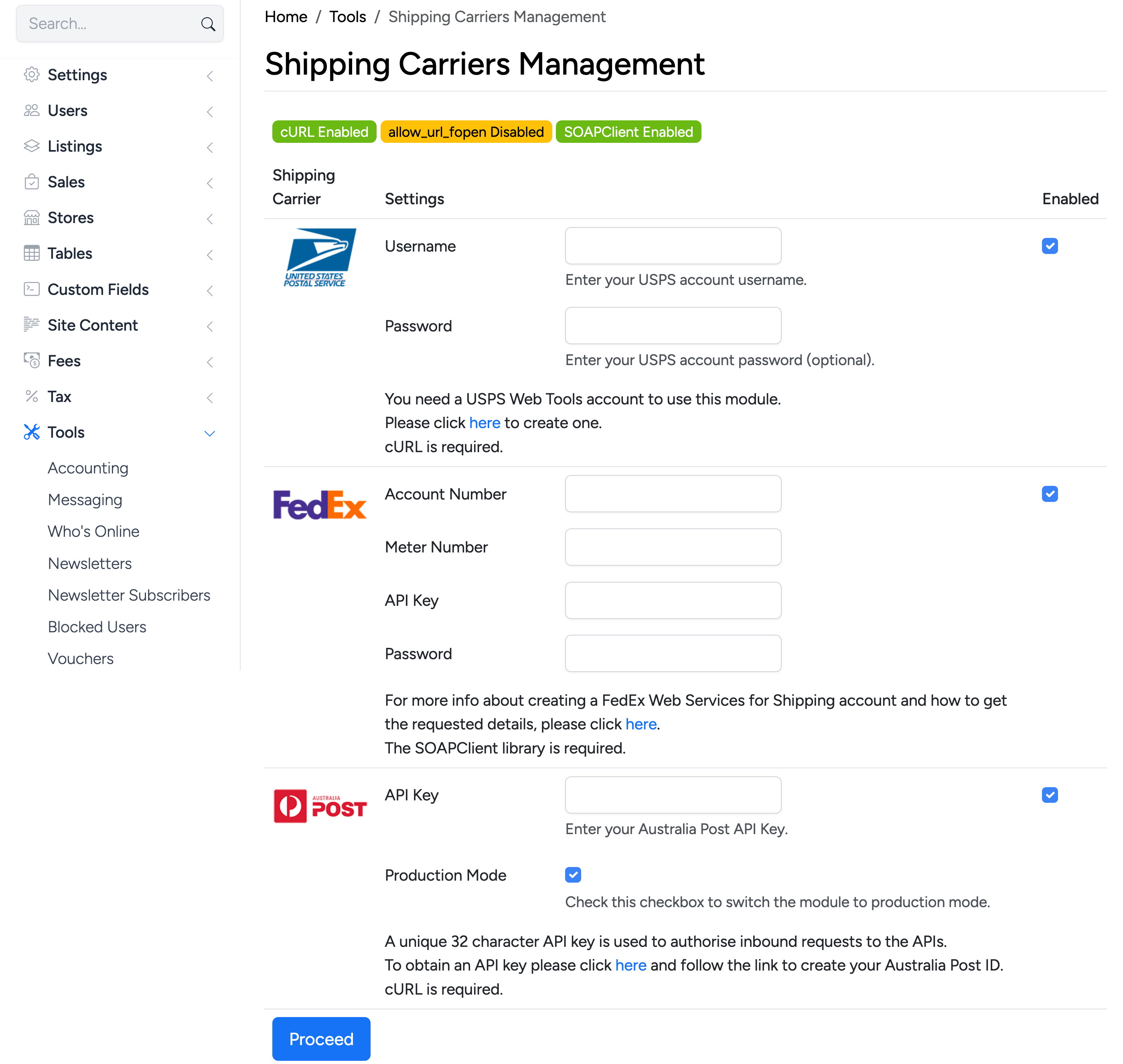
At the top of the page, status badges show which server extensions are available: cURL, allow_url_fopen, and SOAPClient. Each carrier requires specific extensions to function.
Enable a carrier by checking its Enabled checkbox, entering the required credentials, and clicking Proceed. Once enabled, the carrier appears as an option in Postage Setup for sellers who use the Shipping Carriers calculation type.
USPS
United States Postal Service integration. Requires a USPS Web Tools account.
- Username — your USPS Web Tools username.
- Password — your USPS Web Tools password (optional).
FedEx
FedEx integration using the FedEx Web Services for Shipping API.
- Account Number — your FedEx account number.
- Meter Number — the meter number assigned to your FedEx account.
- API Key — your FedEx Web Services API key.
- Password — your FedEx Web Services password.
Australia Post
Australia Post integration for domestic and international shipping rates.
- API Key — a unique 32-character API key used to authorise requests to the Australia Post API.
- Production Mode — check this to switch from test mode to live production rates.