
Auction Sniping
What Is Auction Sniping
The auction sniping feature (also called anti-sniping) automatically extends an auction’s duration when a bid is placed in the final moments. This prevents last-second bidding — the practice of placing a bid just before the auction closes, leaving other bidders no time to respond.
Without this feature, a bidder could wait until the final seconds and place a winning bid before anyone else can react. Auction sniping ensures that every late bid triggers a short extension, giving other bidders a fair chance to respond.
How It Works
When auction sniping is enabled and a bid is placed within the sniping duration (e.g. the last 2 minutes), the auction end time is automatically extended by that same duration. This cycle repeats each time a new bid is placed within the window, until no more bids are received.
For example, with a 2-minute sniping duration:
- Auction is set to end at 3:00 PM.
- Buyer A places a bid at 2:59 PM (within the 2-minute window).
- The end time extends to 3:01 PM.
- Buyer B places a bid at 3:00 PM (still within the new 2-minute window).
- The end time extends again to 3:02 PM.
- No more bids arrive — the auction closes at 3:02 PM.
Seller Option
When creating an auction, sellers can choose to disable the sniping feature for their individual listing. This option is in the Publishing section of the listing creation form.
When disabled on a listing, that auction will end at the exact scheduled time regardless of last-minute bids. This may be preferred for time-sensitive or promotional auctions where a hard deadline is important.
Admin Settings
Auction sniping is configured from Admin → Listings → Settings → Auctions, under the Auction Sniping heading.
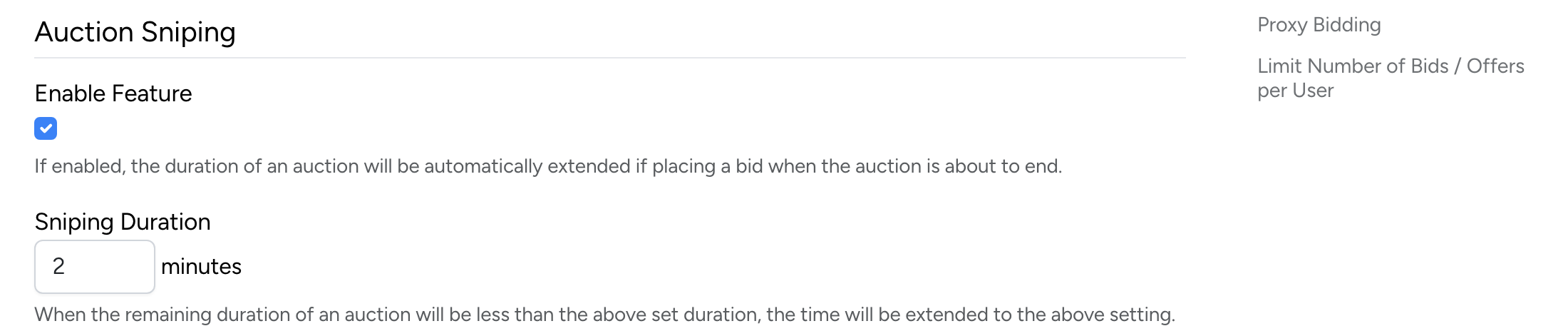
- Enable Feature — check to enable auction sniping protection site-wide. When enabled, auction durations are automatically extended if a bid is placed near the end. When disabled, all auctions use a hard close (no extensions).
- Sniping Duration — the time window (in minutes) before the auction end that triggers an extension. For example, setting this to 2 minutes means any bid placed within the last 2 minutes will extend the auction by 2 minutes.