
Your supporters need to know what they’re bidding on, when the auction closes, and how they’ll receive what they win. This guide walks through a six-item fundraiser in PHP Pro Bid, with actual screens and examples you can adapt for your own event.
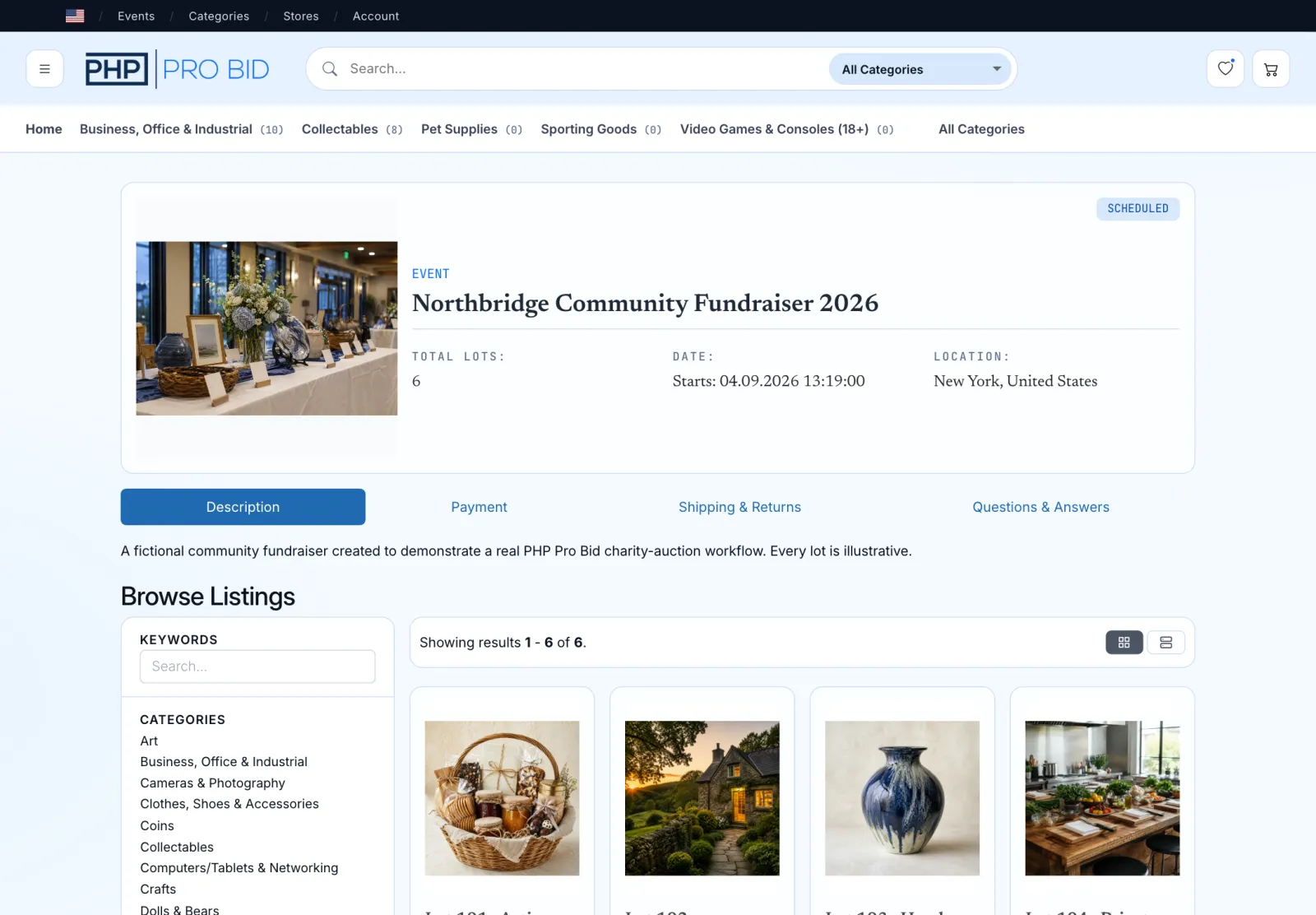
Decide what your fundraiser needs before setting up the auction
For this fundraiser, the plan uses one organizer account, six lots, a seven-day bidding window, local pickup for physical items, and direct booking handovers for experiences. A scheduled Auction Event fits because the lots belong together and can close in a controlled sequence.
Donors do not need seller accounts in this example. They provide accurate item information to the organizer, who creates and manages the listings. Bidders use the website in a mobile browser; a native app is not required. Branded native apps are a separate development service, not part of this browser-based walkthrough.
Choose hosting before creating the event. Cloud and Managed VPS include managed hosting; a Software License requires compatible hosting and technical support. The charity auction software page sets out the plans, costs, and supported workflows.
This guide covers an online silent auction: supporters place bids in their browsers, without an auctioneer calling each bid. If you also need ticketing, raffles, donor CRM, or specific exports, check the platform’s fit before ordering.
Confirms the rules, creates the event and lots, monitors the sale, checks payment, and owns the handover record.
Supplies accurate item details, restrictions, condition information, and a contact for questions or fulfillment.
Registers, reads the terms, places bids, and follows the stated payment and collection instructions.
Donation intake, donor consent, supporter outreach, tax records, and collection coordination remain outside this example's software flow.
Plan backwards from the close. Confirm donated items and choose hosting first. Build and test the listings before sending invitations. Assign opening and closing reminders, payment follow-up, and collection duties. Leave time for this preparation before the seven-day bidding window starts.
Turn donated items into listings people can bid on confidently
Each item, experience, or package offered in the auction is called a lot. A useful charity-auction listing answers three questions: What exactly is included? What restrictions could change its value to the bidder? How will the winner receive it? Ask the donor to confirm these details before publishing the lot.
Give each donated item an internal reference as soon as it arrives. Record who supplied it, who may approve changes, whether the image can be published, and where the item is stored. For an experience, record the person who will honor the booking and the date on which the offer expires. Keep donor contact details in your private intake record. Hold back a lot if an allergen, excluded date, condition issue, or deposit is still unknown.
List the exact contents, ingredients and allergens, best-before information, substitutions, and pickup window.
Confirm nights and guests, redemption deadline, excluded dates, accessibility, pets, deposit, travel, and cancellation terms.
State dimensions, condition and flaws, protective packaging, and who accepts transport risk after pickup.
State duration, location, available dates, age limits, dietary requirements, and cancellation or rebooking terms.
Confirm dimensions, fabric, care instructions, condition, and collection arrangements.
Describe condition, tuning and playability checks, included accessories, inspection options, and pickup.
Physical item description
Artisan Food Hamper. A woven hamper containing two 250 g jars of preserves, a 100 g pack of loose-leaf tea, two 150 g packs of crackers, and a 200 g box of wrapped chocolates. Contains milk and wheat and may contain nuts. All products will have at least eight weeks remaining before their best-before date, and substitutions are not permitted. Collect from Northbridge Community Hall by appointment within seven days of payment; shipping is not offered. Starting bid: £45.
Experience description
Countryside Cottage Weekend for Two. A two-night stay for two adults in a one-bedroom countryside cottage. Redeem within six months of payment, with dates agreed directly with the host; public-holiday weekends and school-holiday periods are excluded. Travel, meals, and pets are not included. The cottage has one entrance step and is not wheelchair accessible. No security deposit is required. One date change is allowed with at least 14 days' notice. The winner receives booking instructions after payment is confirmed. Starting bid: £250.
The starting bid is the lowest opening bid. A reserve is the minimum price required for a sale. If you publish an estimated value, confirm its source with the donor. The planning example uses no reserves; choose them according to your own event’s terms.
Download the six-lot planning worksheet
This editable CSV helps collect item terms. It is not a PHP Pro Bid import template.
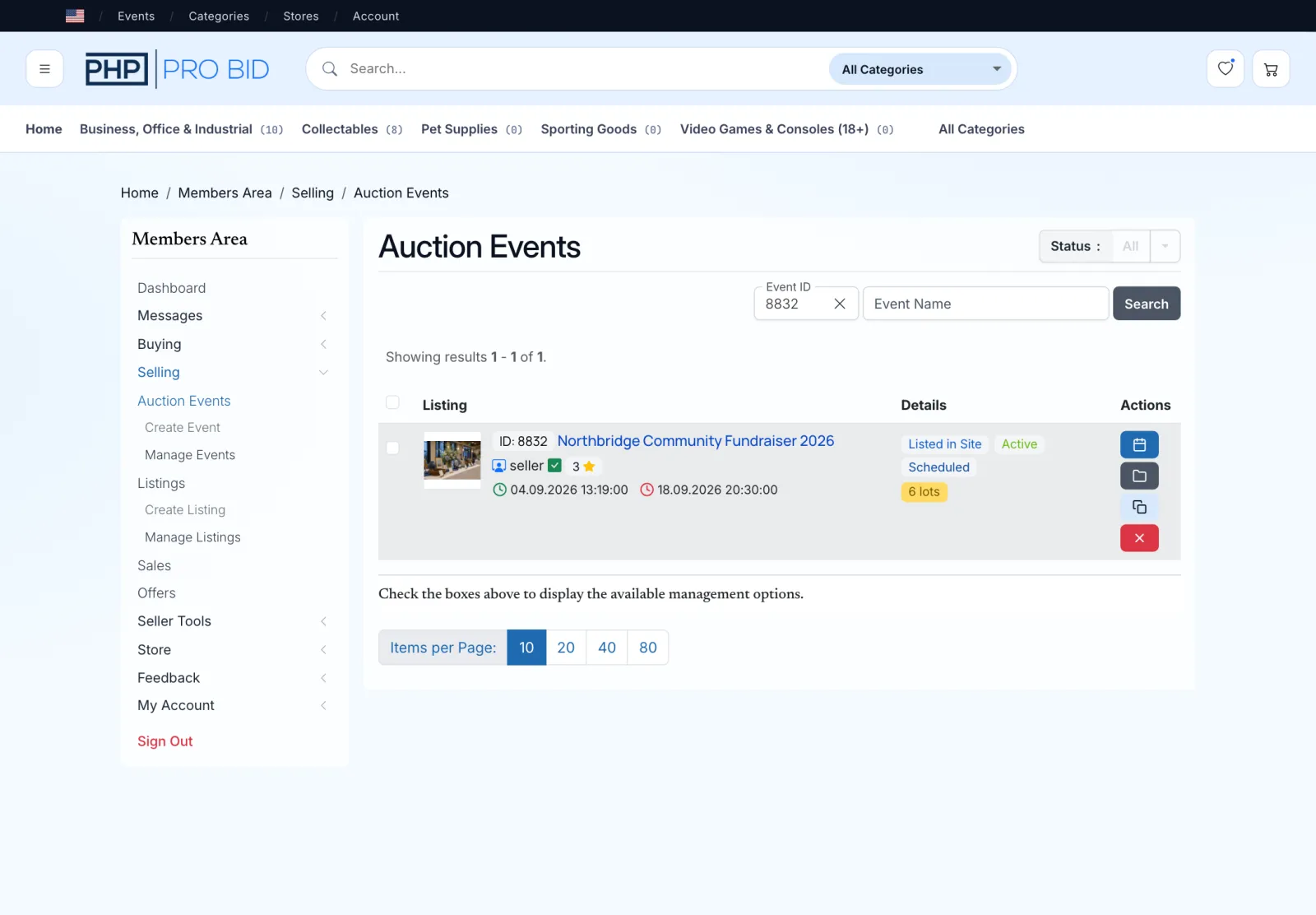
Create the event and make the rules visible
In PHP Pro Bid, create the event first, then attach each lot. Set the title and opening and closing schedule. State the time zone, payment choices, and collection or booking terms in the event description. The Create an Event documentation covers the controls, while the Event Lots guide covers the item-level fields.
Keep the same terms in three places: the event description, the relevant lot description, and the message sent to supporters. A published event may be visible before bidding opens, so confirm the displayed status and dates from a signed-out browser. Review the catalog, then use the documented publish and manage process.
Choose starting bids, increments, and closing rules
The planning example proposes £5 increments for lower-priced physical lots and £10 increments for the higher-priced experiences and guitar. The six lots have no reserve, Buy Out, or offer option in this example. Test each chosen setting before opening bidding.
A proxy bid is the maximum a bidder authorizes the system to use on their behalf, not necessarily the current displayed bid. The proxy-bidding documentation explains how automatic bidding works, while the auction-sniping documentation covers late-bid extensions.
Publish the closing rule in ordinary language beside the schedule. For example: “Lots are scheduled to close three minutes apart. A valid bid placed inside the late-bid window may move that lot's closing time.” Test the closing behaviour before using that wording. An extended lot may overlap the next close, so assign enough volunteers to monitor both.
Walk supporters through the bidding flow
A supporter opens the event link, browses the catalog, chooses a lot, signs in or registers, enters a bid, and confirms it. From the lot page they can see the current bid, the next acceptable amount, the closing time, and the rules attached to that item.
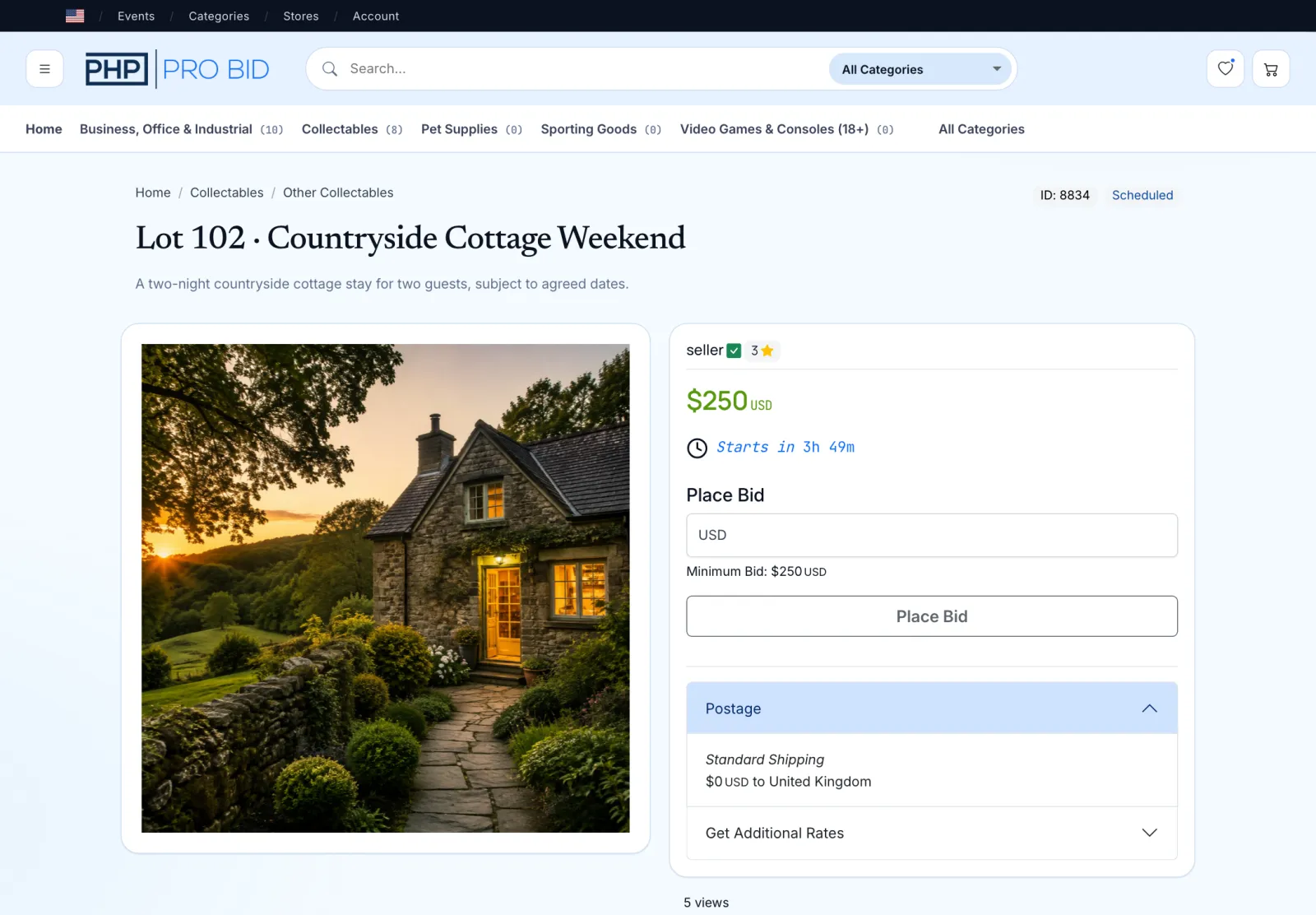
Try the bidder and organizer views
Open the live demo and try these checks before choosing your plan:
- Open an auction listing and find its description, current bid, and closing time.
- Use the buyer login to inspect the bidding controls and bid history.
- Switch to the seller or admin demo to inspect listing and auction-management tools.
The public demo uses its own sample listings; the Northbridge screens here show a separate worked example.
- Browse and choose. Supporters open the event catalog and select the item or experience they want.
- Read before bidding. The lot page shows the description, collection or booking terms, current bid, and closing time.
- Place and confirm. The bidder enters an amount or proxy maximum, reviews it, and confirms the bid.
- Return when needed. If another person bids higher, the supporter can revisit the lot and decide whether to continue within their own limit.
Give supporters the information they need to participate
Share the event link through your supporter email list, newsletters, or community groups. Include the purpose, opening and closing schedule with time zone, registration instruction, payment deadline, pickup or booking terms, and a monitored support contact.
Assign opening and closing reminders to a volunteer. Check which notifications your site sends automatically and schedule your own outreach separately.
Move winning lots through invoice, payment, and handover
After closing, match each sold lot with its winner, invoice, payment status, and collection or booking record. PHP Pro Bid provides invoice records and configurable payment gateways; the organizer confirms the payment and completes the handover.
- Review the winners. Match every sold lot to its winner and final amount, while separating unsold lots for follow-up.
- Check the invoice. Match each winning lot and amount to the invoice. If you plan to combine purchases, verify the available invoice workflow on your installation.
- Confirm payment. Decide who receives the money, who may verify it, and which status allows the item to be released.
- Arrange the handover. Give the winner the pickup details or connect them with the person responsible for an experience booking.
Confirm payment against the payment provider or bank record you use for the event. Record the reference beside the lot and invoice, then note any refund and the completed handover. This is the reconciliation record your team will use to resolve discrepancies.
Handle unsold items, cancellations, and collection
Before opening, publish your payment and collection deadlines. Assign a volunteer to handle unsold lots, unpaid invoices, refunds, and missed pickups; record the next action in the handover sheet.
Mark the result accurately, then ask the donor whether to return the experience, offer it elsewhere, or include it in a later sale. Only offer automatic relisting or a second chance when that workflow has been configured.
Check the invoice state, send the organizer's agreed reminder, record the response, and apply the published deadline. An unpaid winning bid stays outside collected cash.
Stop fulfillment, contact the winner, document the agreed remedy, and coordinate any refund through the actual payment route. Use only replacement dates or accommodation agreed with the winner.
Verify the payment reference, agree a collection or booking time, note who releases the item, and have both sides confirm completion.
Download the settlement and handover worksheet
This is an external organizer worksheet with blank result fields, not a native PHP Pro Bid export.
Work out the costs before calling the auction a success
PHP Pro Bid charges no percentage of winning bids. Budget for the software plan, payment processing, hosting where applicable, optional setup or customization, refunds, and item fulfillment. The monthly-billing prices are £79 for Cloud and £199 for Managed VPS; the self-hosted License is £399 once.
Keep unpaid bids outside the collected amount. Use the current PHP Pro Bid pricing page for plan terms and the auction software cost calculator to compare the platform costs against your own time frame. Use your payment processor’s actual rate.
| Plan | When it fits | Next step |
|---|---|---|
| Cloud | Your team wants hosting and installation managed. Check the expected bidder activity and event size before ordering. | Choose Cloud |
| Software License | Your team has compatible hosting and technical support. Budget for hosting, maintenance, and any installation help alongside the one-time licence. | Choose License |
| Managed VPS | You want a dedicated virtual server with hosting managed. Confirm the expected number of bidders, concurrent activity, and closing pattern with PHP Pro Bid. | Choose Managed VPS |
Cloud and Managed VPS offer monthly or annual billing. Check the full annual payment on the pricing page before comparing it with a monthly subscription. If you are unsure about event capacity, ask about your setup before choosing a plan.
Keep auction invoices and donation records separate
An auction payment purchases goods or services; it is not automatically treated as a charitable gift. The applicable rules depend on the jurisdiction, the item's value, what the winner paid, and the organization's status. In the UK, review HMRC's charity-auction guidance. In the US, review the IRS guidance for charity auctions.
Treat the software invoice as the auction transaction record. Issue any separate acknowledgment required by your jurisdiction independently, and ask an appropriate adviser to review the process for your real event.
Run this pre-launch check
- Every donor has confirmed the item, condition, restrictions, and fulfillment contact.
- The event page and every invitation show the same dates, time zone, payment deadline, and collection terms.
- All bidder-facing charges and payment methods are visible before a bid is placed.
- A supporter can open the event, understand a lot, register, bid, and find the closing time without organizer help.
- The organizer understands proxy bids, staggered closing, and the chosen late-bid extension rule.
- A test auction has produced the expected winner and invoice; the chosen payment route has been tested and the payment reference matches the invoice before handover.
- Someone owns unsold-item, nonpayment, refund, collection, and experience-booking follow-up.
- The planning and handover worksheets download correctly, and every sold lot has an assigned route from winner to invoice, payment confirmation, and handover.
Keep the planning worksheet with your item records and the handover worksheet with your payment records. Use both during the launch check and update them as each winner pays and collects.
Questions before you launch your charity auction
Can supporters bid without installing an app?
Yes. This example uses the auction website in a mobile or desktop browser. Supporters register or sign in before placing a bid. Include registration instructions in your invitation and test them on a phone before launch.
Do I need my own hosting?
Cloud and Managed VPS include managed hosting. A Software License is self-hosted, so your team supplies compatible hosting and technical support. Compare the plan terms and include running costs in the event budget before deciding.
Does PHP Pro Bid charge a percentage of charity auction bids?
PHP Pro Bid charges no percentage of winning bids and no per-event software fee. You still pay for your chosen plan, and your payment processor can charge transaction fees.
Can I run this charity auction for free?
PHP Pro Bid is paid software. Choose a one-time Software License or managed hosting subscription. The worksheets are free to download. Budget separately for payment processing, hosting where applicable, and other event expenses. Use the cost calculator to compare your assumptions.
What happens if a winning bidder does not pay?
Follow the payment deadline and follow-up policy you published before bidding opened. Check the invoice, contact the winner, and record the next action. Keep unpaid bids outside collected cash and hold the item until payment is confirmed. The exception examples cover nonpayment and collection.
Operational reference: the item, payment, delivery, and contingency advice also reflects the Chartered Institute of Fundraising's fundraising-auction guidance. Product behavior links point to the PHP Pro Bid v10 documentation.